I have been using Google AdSense to monetize my blogs and websites for as long as I remember. In fact it was the first method I ever tried (I made a whooping $15 on my first month… back in 2005). Over the years I migrated to other methods (e.g., direct sponsors and affiliate marketing), which made AdSense become merely an inventory filler. I was still making around $1,000 monthly from it, but whenever I could I would use other methods over it.
Then some months ago I started noticing an upward trend on the CPC of my sites, and I figured that I should give AdSense another try. I started applying some tricks here and there, and the next month I made over $3,000 with it (that is combining all my sites). I was pleasantly surprised, and I decided to keep using it actively on some sites.
In this article I want to share with you the tips and tricks I used to triple my AdSense earnings in one month.
1. I added units to my Big Websites
Daily Blog Tips and Daily Writing Tips are my largest websites in terms of traffic. They are getting close to one million monthly page views (combined). Despite that I was not using AdSense on them, mainly because the direct sponsorship model was working relatively well.
Some months ago I decided to load some AdSense units on the sites, however, and the results were very positive. Around 70% of the boost I generated to my earnings came from these two sites. At the same time I managed to keep the other monetization methods working fine, and no reader ever complained about the new ads (more on that later).
Even if your blog is already making money with direct sponsors and affiliate marketing, therefore, you could still manage to increment your earnings by strategically adding some AdSense units.
2. I added units to my Small Websites
As many webmasters do, I have a bunch of small websites scattered around the web. Some are on free hosted platforms like Blogger, and others are self hosted sites that I abandoned along the way. Most of these sites still get traffic, however. Not much, but combined the numbers get decent.
I figured that adding AdSense units to all these sites could yield some money, and I was right. The main reason is that, since these are abandoned sites and don’t have loyal visitors, I can place the units very aggressively. The result was a very high CTR (Click-through rate), which compensates the small traffic levels.
Don’t underestimate the earning potential of small websites, especially if you are willing to place AdSense units aggressively.
3. I used the Large Units
If you want to make money with AdSense you’ll inevitably need to use one of these units: the 336×280 large rectangle, the 300×250 rectangle, the 120×600 large skyscraper or the 728×90 leaderboard.
Whenever I tried to use smaller units the results were disappointing. Even if I positioned them aggressively the CTR was just too low.
All four units mentioned above can produce good results, but the best performing one is by far the 336×280 large rectangle, and that is the one I used to boost my earnings.
4. I placed the Units above the Fold
My first trial was to place the 336×280 large rectangle between the post and the comments section of my blogs. The results were OK. I then decided to try placing them below the post titles for one week, and the CTR skyrocketed. In fact I still need to find a placement/unit combination that will beat placing a 336×280 unit below post titles.
I knew this rule, but I guess I needed to test and get confirmation. The rule is: if you want to make money with Google AdSense, you must place your units above the fold.
5. I Focused on Organic Traffic
My main concern with adding a large AdSense unit right below my post titles was that some of the loyal readers could get annoyed with it. At the same time I knew that loyal readers become ad blind quite fast, and that the bulk of my money would come from organic visitors (i.e., people coming via search engines to my posts).
To solve this problem I decided to display the large rectangle only on posts older than seven days (using the Why Do Work WordPress plugin). It worked like a charm, as loyal readers don’t even notice the ad units when they are browsing through my recent posts, and organic visitors almost always see the ads because they usually land on posts older than seven days.
6. I started using AdSense for Search
I was not sure how much money I would be able to make with AdSense for Search, but I was not happy with the search results provided by WordPress, so I decided to give it a shot anyway.
Currently I am making around $60 monthly with AdSense for Search. It is not much, but if you sum it over one year we are talking about $720. On top of that the search results are as relevant as you’ll get, so it is a win win situation.
7. I started using AdSense for Feeds
Another AdSense product I decided to try was the AdSense for Feeds one. I opted to display the ads below my feed items (you can also place them on top, but this would be too intrusive in my opinion). The results here were pretty good, both in terms of CTR and earnings.
You obviously need a large RSS subscriber base to make this work, but I am guessing that even with a couple thousand subscribers you could already make $100 monthly from feed ads.
8. I played around with section targeting
Section targeting is an AdSense feature that allows you to suggest specific sections of your site that should be used when matching ads. You can read more about it here.
I found that on niche and small websites section targeting can help a lot. Often times Google was displaying unrelated ads on these sites because there weren’t enough pages. After using section targeting I managed to increase the relevancy of the ads and consequently the CTRs.
9. I tested with Different Colors and Fonts
If you enabled both image and text ads on your units you should be able to customize the colors and fonts. I did some testing with both of these factors, and it helped to increase the numbers. Nothing dramatic, but it was definitely worth my time.
You just need to track your CTR for a couple of weeks. Then change the color or font and track it for another week, seeing if you can beat the original CTR. If you can, keep the new format. If you the performance decreased, try a new color or font and track the CTR for another week, until you find the optimal combination.
On my sites the best results came from making the ad units merge with the look of the site, but on some sites contrasting colors perform better, so testing is a must.

Ads can work well in-between other stuff. On a games site of mine, some of the games don't contain ads next to the game area; the AdSense ad will only be shown in-between game rounds. This is the time the visitor is not concentrating on performing a task but might take a small break, and be open to the option of visiting new sites.
Put too much emphasis on AdSense and your site may be linked to less. The more available space you dedicate to AdSense on your site, and the less you differentiate between ads and content in your design, the more money you earn with the program, right? Not quite. While pushing the AdSense may result in short-term gains, it might also convince some visitors that the site is too crowded to be worth visiting again. And some of those visitors may also be bloggers or other people who might otherwise help to promote your site with links to it. And the less your site gets linked to, the less traffic it gets, meaning AdSense revenues may go down in the long term.
Even if you get huge traffic, the AdSense income from the site is more dependent on the site type and audience. Google targets AdSense ads automatically to the site content. Or at least, it does so ideally – but some types of content fare better than others with this targeting. I noticed for instance that AdSense does better on a games site than on a technology blog. I also heard people say that AdSense does quite good on product oriented blogs; say, one post solely about the iPod; another post solely about Gadget XYZ, and so on.
Image ads can be relevant and work for you, but they might also apall some visitors. Google's AdSense program gives you the option to choose between a couple of different ad formats. Two main groups are text ads vs text & image ads. When you choose the latter, Google will deliver what they deem works best for your content (or so one would hope, and it would be in Google's best self-interest to serve you the best possible ad, it seems).
However, Google doesn't really know your layout preferences, and they don't really understand when your audience thinks ads are "too much"; and considering image ads include Flash animations (which you can't disable, once you go for image ads), Flash animations may well push some people away. One thing you can do is to only show image ads in areas where they don't disturb the content, e.g. at the end of posts. Also, you might want to listen to visitor feedback on the ads being served; I received emails before that the blinking ad on this or that site made a person want to leave the site, at which point I blocked the specific advertiser via the AdSense Setup -> Competitive Ad Filter option.When it comes to context sensitive targeting, you can increase or lower the importance of certain parts of your page. To help Google find a matching ad for your content, you can use the HTML comment syntax by encapsulating more important parts with
Or, to lower the importance of a section, use:
... your important site content here ...
.
(Google notes that it may take up to 2 weeks for this change to your site will be taken into account by the AdSense.)
... your not so important site content here ...
What if your site doesn't have any good matchable content to begin with, though? Say, the page just includes an image. Well, for the reasons of search engine optimization but also ad optimization you might want to consider using at least a descriptive title, an explanatory footer containing the important keywords or keyphrases (the kind of footer that actually helps the human visitor by explaining what the page is about). In the case of image content, reasonable alt and title attribute texts should be used as well.*
*Whatever you do, don't resort to "keyword-stuffing" as it doesn't help your visitors and may get your page ranked lower in search engines.Be aware of risks when you change ad layouts too much. I once had a system on the server to randomly differ between various AdSense layouts on the same page. Doing so I was hoping to add some good variety to keep the ads at least somewhat interesting and notable. Shortly after I stopped doing so and simply included a rather big static area for the AdSense to "do what it wants," the AdSense revenues for that site increased. Now, I don't know if this was a coincidence of some sorts, as revenues often go down or up even when you don't do anything, but it might well have been that there was a connection between adding too much homemade randomization, and lowered revenues.
At another time, during the redesign of this blog, I switched from one ad format to another for the end-of-posts AdSense ad space. This, combined with perhaps other layout changes, suddenly cut the ad revenues in half for the blog. It took me some time to realize that I had some ad channels* set up for the specific old layout size, and by changing this I must have kicked out all those advertisers who were pushing their ads through the channel.
*This setting can be found at AdSense Setup -> Channels.Use competing ad systems when AdSense doesn't seem to work for a site. At CoverBrowser.com, which shows galleries of comic and book covers and so on, I tried including AdSense ads in "non-annoying" places in the layout (including trying to use AdSense affiliate links via AdSense Setup -> Referrals), but this didn't seem to work at all. However I then tried "affiliating" the "buy" link below individual covers, utilizing the eBay affiliate commission system offered by AuctionAds.com*. (Disclosure: Patrick Gavin, co-owner of AuctionAds, paid me for consulting before on other projects, like Sketchcast.com.) This worked a lot better, and as it was simply connected to an existing site feature, it also didn't add clutter.
A good start to find other ad programs is to search for adsense alternatives on Google... you will see a lot of lists which are dedicated to competitors. (Note that some of these competitors may be US-only.) You may also want to join an ad or blog network like The Deck, Federated Media (disclosure: I was part of Federated Media before), or 9 Rules. Before joining such a network – which might require you to show them your traffic stats and so on – check if their typical ads and campaigns fit with your site layout and your general ad type preferences.
*CommissionJunction also offers an eBay affiliate system but CommissionJunction has really low usability, in my opinion; setting it up is confusing.Sometimes you may get a sudden increase in traffic, hence ad clicks, but you can't locate the source of the traffic. I'm using Google Analytics to track my sites, though AdSense is also a good first indicator of traffic explosions... because it will show the combined page views of all your sites (provided you include AdSense on all of them), as opposed to Google Analytics, where you need to check site by site individually.
However, sometimes even with Google Analytics, you won't be able to locate the source of your traffic because there's no specific new popular referrer being shown (a referrer is the site linking to your site, provided people click on that link). In these cases, it may well be that your site has been discussed in a TV show or similar, as the show won't "link" to you (but audiences will be entering your domain manually into the browser when they like what the saw on TV). When you feel that there has been a traffic explosion sometimes you may get additional email feedback in regards to your site, and it makes sense for you to ask your visitor: where did you first find out about the site? Maybe the can let you know about the name of the TV show, or magazine, or other "offline" source responsible for the peak. (I sometimes sent pointers to the BBC Click show for instance, with partly enormous effect.)Consider using AdSense even when the page doesn't get any traffic yet. Who knows, some day the traffic suddenly explodes, and you might not realize fast enough and thus miss out on the action (as sometimes, traffic goes as fast as it comes).
On the other hand, reversely I would suggest to never do a site just to make ad money with it. That kind of motivation may lead to spammy sites that don't help anyone really. (If a project is great, it's great even if it doesn't make any money.)Making money with AdSense takes time. In my experience, it may take many months to years for a site to gain enough traffic to make OK money through AdSense... if ever. I have almost never experienced any site making quick and easy money with AdSense (though you may be getting quicker results than me of course, as it depends on so many variables!).
I think for any site getting a couple of thousands of visitors a day, you might want to start playing around with AdSense to see where it takes you (if you didn't already include AdSense anyway just to see what happens, and following up on tip #9). As you are paid in US-$, the actual benefit the ad revenue will bring depends on your local costs of living as well (you might even ponder moving or going on an extended holiday trip if your local costs of living are too high for your site revenues to cover).
PS: What are your AdSense tips?
AdSense delivers relevant ads that are targeted to the content people find on your site.
In many advertising networks and websites, including AdSense, the advertiser is charged for advertising their ad only when a user clicks on their ad. How much they pay (for that click) is called their Cost Per Click or CPC.
Here you will find some simple and effective AdSense tips that will increase your revenue. If you haven't already joined AdSense program, you should sign up first.
Top 15 AdSense tips
AdSense Tip #1: Find your keywords
Before serving ads on a web page, check its keyword density. A free and advanced tool for finding the most prominent keywords in a page can be found here: SEO Density Analyzer. Copy the most important keywords to a text file ([web page name]-adsense-keywords.txt).
AdSense Tip #2: Improve your keywords
Get keyword suggestions from Overture Search Inventory and from Google AdWords Sandbox. Get new keywords that can help you improve your ad relevance. Enter the keywords from [web page name]-adsense-keywords.txt and save the suggestions to [web page name]-adsense-suggestions.txt.
AdSense Tip #3: Keep your website focused on a theme
Use the keyword suggestions to enhance your web pages and to build theme-based content. And also try to get your keywords into the anchor text of your incoming links as much as possible. Don't forget that Google AdSense is keyword-targeted advertising: Google AdSense bases its advert topics on your websites content, this means that content-rich websites of a popular topic should attract a large amount of ads.
AdSense Tip #4: Write a new page every day
One of the best tips is to add a new page to your web site every day. The more content you have, the more visitors you will get. Put an Adsense unit on each and every content page of your site. But where? You will find more about that from the next AdSense tips.
AdSense Tip #5: Choose the right AdSense format
Wider formats are successful because the ads are compact, easy to read and are complementary to the content. The top three AdSense formats are:
- 336x280 large rectangle
- 300x250 medium rectangle
- 160x600 wide skyscraper
Another successful format is the 468x15 horizontal ad links, that can be placed under your navigation bar.
More AdSense Tips
- AdSense Tip #6: Color tips
- AdSense Tip #7: Position tips
- AdSense Tip #8: Increase the number of ads
- AdSense Tip #9: Preview Google ads
- AdSense Tip #10: What not to do
- Plus: official Google AdSense tips
Read these tips in the second part of AdSense tips.
Google AdSense is a simple and low-risk way for publishers to quickly monetize their content. The pay-per-click ad system has created an opportunity for anyone to instantly have advertising on their website, without the hassle of having to actively sell ad space. AdSense makes up a good portion of the advertising revenue for many websites, and other websites may use AdSense to earn the bulk of their revenues. Either way, AdSense is an excellent system for monetizing your content.
In this post we present an ultimate collection of resources, tools and tips to help you make the most out of Google AdSense. Among other things, this post covers various Google AdSense tools, Firefox-extensions, WordPress-plugins and related resources.
Please feel free to suggest related tools in the comments to this post. You may also be interested in our post Google AdSense: Facts, FAQs and Tools that was published two years ago.
[Offtopic: By the way, did you know that Smashing Magazine has a mobile version? Try it out if you have an iPhone, Blackberry or another capable device.]
1. Google AdSense Tools
iPhone AdSense Statistics Application
SenseApp is a program that lets you track your Google Adsense earnings on your Apple iPhone.
AdSense Earnings Tool
Free and fast tool to monitor adsense earnings in realtime. This tool posts all the correct post fields to Googles universal Account Services login and collects information about your earnings. You’ll able to see today, yesterday, this month and since last payment earnings. You don’t need to log in to Google anymore.
Google AdSense Toolbox
Type any web page URL (e.g. cnn.com) or keywords (e.g. web development), select a country (optional) and hit Enter to see the latest Google Ads that are contextual and geo-targeted.
Google AdSense Preview Tool
an addition to the right-click menu for Windows Internet Explorer 6.x, allowing you to preview the ads that may show on any webpage. With just a few clicks, you can see what ads may appear on your new webpages, or make an educated decision on whether to add AdSense to your existing site pages.
Google Search-Based Keyword Tool
The search-based keyword tool allows you to find high-paying keywords to target, based on the domain name you specify.
Google Traffic Estimator
The Google Traffic Estimator is an easy way to determine the search volume of certain keywords, and it shows related keywords and their volumes as well.
SpyFu
SpyFu allows you to look up any website and see how much it is spending on AdSense, how it ranks for each keyword, and which keywords it buys. The tool is quite useful for researching competitors.
adsblacklist
Identify and block low-paying advertisers and increase ROI with AdSense.
2. Google AdSense Online Tools
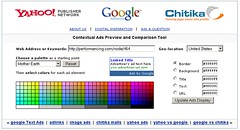
Contextual Ads Preview/Comparison Tool
This comparison tools comes in handy when you compare AdSense ads to those of other advertisement services (Chitika, Yahoo). You also have the ability to customize the colors and view what ads a certain URL would be likely to display.
Google AdSense Calculator
This AdSense Calculator is designed to help you to predict changes in your earnings depending on improvement (or deterioration) of Page Impressions, Click Through Rate and Cost Per Click. You can download further calculators here.
WordTracker
During the search, people use different keywords. Using this tool, you can find the most effective words before deciding what content to include on your page. Not free, but the free trial is available.
Traffic Estimator Sandbox
To use this tool, you need an AdWords account. This traffic estimator helps you to figure out what keywords result in the highest paying AdSense ads (more details on uphook).
Pubmatic
While Pubmatic isn’t strictly an AdSense tool, it will definitely help you earn more money from your website by optimizing your ads. With each page view, Pubmatic determines whether showing an AdSense ad or an ad from a different network would be best, based on the CPM.
AlterNut Ad
Instead of earning nothing from the PSA ads that Google fills the page with when it has no ads to show, earn a set fee by giving AlterNut Ad your unused PSA ads.
3. Google AdSense Firefox Extensions
AdSense Notifier
This extension displays your AdSense earnings in the status bar.
AdSense Preview
Check what Google ads would be displayed if they were shown on a particular page with this preview tool.
Money Quake
Money Quake allows you to see your real-time earnings for many popular advertising programs, including AdSense.
GraphSense
GraphSense gives you a visual look at your AdSense reports by adding graphs to the interface. As of this post, the extension is still classified as “experimental,” so you’ll have to log in to Mozilla to install it.
4. Official AdSense Resources
Google has provided some official tools and resources to help publishers get started with AdSense.
Google AdSense Help Center
A database of questions and answers about the AdSense program.
Inside AdSense Blog
The official AdSense blog. Find news, tips and other features about the ad system here.
AdSense Community Forum
Have an AdSense question? Ask a community of publishers and the AdSense team.
Official Optimization Tips
A collection of tips provided by the AdSense team.
Official AdSense Channel on YouTube
Instructional videos and interviews by successful AdSense publishers.
Interest-based advertising with Google AdSense
Just recently Google announced the launch of interest-based advertising. This help section addresses the new mechanism and explains how you can benefit from it.
5. Getting Started with AdSense
Because of the popularity of AdSense, many so-called “experts” out there try to give “inside information” or sell their secrets in the form of ebooks. If you’re truly a beginner to AdSense, use the official AdSense help database that Google provides.
Here are some “getting started” articles by a few trusted authors.
Problogger’s AdSense Tips for Bloggers
Darren Rowse’s excellent eight-part series will get you well on your way to making money from AdSense.
The Ultimate Beginner’s Guide to Effective AdSense Link Units Optimization
A great rundown of the different types of link units and how they’re best used in a website layout.
Where Should I Place Google Ads on my Page?
The Google AdSense team has made a helpful map showing the different regions of a website layout where AdSense units perform the best.
6. Optimization Tips
Like any ad system, AdSense can be optimized to generate more clicks and revenue. Here are some tips to help boost AdSense performance.
Adsense Success Stories
Several examples of websites that increased their earnings significantly with Adsense. The success stories talk a lot about ad optimization, etc.
Google AdSense Tips
Google Blogscoped provides an excellent collection of AdSense tips based on its experience with implementing Google ads.
My top 5 tips for increasing adsense earnings (without increasing traffic)
Experiment with color and position, use different adverts for different dates, use content targeting, referrals and take care of the SEO.
Eye-Tracking Studies by Jakob Nielsen
Great eye-tracking examples that show where users’ eyes start and end up on a page.
Adsense Tips, Layout Optimization Tricks for Higher CTR
A collection of excellent do’s and don’ts for new publishers, as well as advice for more advanced AdSense users.
Rotate Google AdSense Ad Colors : Reduce Ad Blindness
One of the many enemies of publishers who rely on ads is banner blindness. Rotating ad colors is a good way to combat banner blindness, resulting in more clicks on ads.
Google AdSense Tips, Tricks and Secrets
Popular SEO blogger Michael Gray has an extensive post on various AdSense tips and performance boosters.
How to Display Ads Only to Search Visitors
Click-through ratios are much higher if you show your AdSense units only to visitors who were referred by search engines. Here’s an article on how to implement that functionality on your website.
Using the Competitive Ad Filter to Increase AdSense Earnings
Learn how to block made-for-AdSense websites as competitors, allowing only the best and most relevant ads to show on your units.
100 Google AdSense Tips
While this article is a few years old, it still has some very valuable tips on how to optimize Google AdSense. Perfect for the beginner.
20+ Practical and Ethical Tips to Earn More Revenue from Google AdSense
eTechBuzz shows us some useful and ethical AdSense tips.
Blogmitize!
The Official AdSense Blog has a post on how to make the most money from your blog layout.
Little Known ‘Boring’ Websites that Make Incredible Money with AdSense
An article highlighting that nearly anyone with a niche website can make money from AdSense.
7. AdSense WordPress Themes
WordPress is the most popular blogging platform, so it’s no surprise that a few themes come AdSense-ready, with ad placements already determined.
8. AdSense WordPress Plug-Ins
If you want to integrate AdSense in your existing website, here are some plug-ins to help display your ads.
AdSense Manager
The AdSense Manager widget allows for the automatic creation of AdSense ad zones on your WordPress blog. The plug-in also supports other ad networks, such as YPN, AdBrite and Commission Junction.
Easy AdSenser
Easy AdSenser is a feature-filled plug-in that allows you to easily insert AdSense into your posts and layout. It has an extremely user-friendly interface, with lots of features that make adding AdSense much easier than it is with other plug-ins.
AdSense Revenue Sharing
Share AdSense earnings with co-authors using the AdSense Revenue Sharing plug-in.
All in One AdSense and YPN
Use the All in One AdSense and YPN plug-in to automatically insert YPN and AdSense ads into your existing blog posts.
AdSense Under Image
If a post has an image, this plug-in automatically inserts an AdSense block under the image.
AdSense Deluxe 2
Another plug-in to automatically insert AdSense ad units into blog posts.
Google AdSense for Feeds
A simple plug-in that places AdSense in your blog’s feed.
Ozh’ Who Sees Ads
Determines what type of visitor will see ads on your website. This plug-in allows publishers to hide ads from regular visitors and show them only to search visitors.
9. AdSense Books
If you’re looking for an entire collection of tips and advice on making the most out of AdSense, you might want to try a print book instead. Plenty of excellent AdSense articles are available online, but on the whole, it is easier to find more accurate information in print media. Here are some of the most popular books on AdSense.
The Best Damn Google AdSense Book
Google Advertising Tools: Cashing in with AdSense, AdWords and the Google APIs
The Google AdSense Millionaire
10. AdSense Forums and Communities
Webmaster World AdSense Forum
The WMW forum is by far the best forum for getting expert advice on AdSense. A member of the Google AdSense team actually reviews all the threads and answers questions, so the information is legitimate.
Digital Point AdSense Forum
Digital Point’s AdSense forum isn’t as strict as the Webmaster World forum, so there is a lot of engagement but less experienced users and less informed advice.
SEOChat
SEOChat doesn’t have an entire forum dedicated to Google AdSense, but it does have a thriving forum for affiliate marketing in which many AdSense topics come up on a regular basis.
11. Those Against AdSense
It’s always a good practice to hear the other side of the story when rounding up resources on a topic, especially one as controversial as AdSense. Many experts argue that AdSense isn’t the best choice for publishers to monetize their content. Here are a few articles that criticize AdSense.
Dear AdSense, You Broke My Heart
Problogger Darren Rowse’s open letter to AdSense about why he was disappointed in its decision to change the referral policy for publishers outside the US.
Have You Weaned Your Blog from AdSense Yet?
A convincing argument for moving from AdSense’s cost-per-click structure to CPM ads and other affiliate programs.
Why You Can’t Make Money Blogging
Copyblogger’s Brian Clark provides some compelling reasons to ditch AdSense and sell products that solve real-world problems.
10 Reasons Why People Hate Google AdSense
A round-up of thought-provoking reasons as to why Google ads repel publishers. Some of the reasons include: the ads are ugly, Adsense is everywhere, poor email support with the Google team and many others.
(al)
Now you know how to make money with Google Adsense but to help you improve AdSense performance (and advertising revenue), here are some of the best Google Adsense Tips and Tricks for making more money (profit) from the Google Adsense program.
About me: I have been using Google AdSense since 2004 and my technology blog was recently featured as an AdSense Case Study.
Update: Some of the AdSense tricks in the article are old so you may please check my latest article on AdSense Optimization Tips that includes a PowerPoint presentation as well.
Tips to Increase Google AdSense Earnings
a. Strictly follow the rules mentioned in Adsense policies. You will always earn more revenue from Adsense by playing it clean.
b. Never modify the Google Adsense HTML code. If have trouble embedding AdSense code in your WordPress or Blogger template, take help of the AdSense support forums or send an email to your AdSense account manager.
c. Never ask your friends or visitors to click on your Google ads. Google takes click fraud very seriously. Do not include incentives of any kind on your site for users to click on your ads. Don't label Google ads with text other than "sponsored links" or "advertisements.".
d. Don't click on your own ads - Google is much smarter than you think and can discover invalid clicks through IP addresses, site navigation patterns, etc. If you working on a new design for your site, avoid reloading your pages (with AdSense) excessively. You can turn off AdSense temporarily and avoid invalid CPM impressions. Or you can use the unofficial Google Adsense Sandbox Tool that is accessible from Firefox, IE and other browsers to see what kind of Google ads will be served based on content (website address URL) or keywords.
e. Don't place ads in pop-up windows,
f. Don't start a "adsense asbestos" or "home equity loan rates" website merely to make money from accidental clicks. You will never make money out these Made for Adsense websites. Instead, write on topics what you are passionate about. Don't waste your money on high-paying adsense keywords lists. Stay away from AdSense Adwords arbitrage.
g. For short articles, CTR is best when ads are placed just above the content.
h. For long articles, CTR will improve if you place ads somewhere in middle of the content or just where the article ends - when visitors are done reading the article, they may be looking for related resources.
i. Use Text Ads instead of Image Ads as users get more options and the payout is often higher. If you still want to display image ads (for CPM), consider ad formats like the 300x250 medium rectangle or the 160x600 wide skyscraper as they support also support rich multimedia and the new gadget ads.
j. Google Ads with no background color and no borders will always perform better. Make the border color and background color same as your page background color.
k. Always put ads above the main fold. Make sure that the ad unit with the highest clickthrough rate is the first instance of the ad code that appears in your HTML source. Since the first ad unit is always filled before the rest, you want to make sure that ad unit is located in the best placement on your page.
l. Try setting the ad link URL color to a lighter shade. If your text is black, you may make the adlink as light gray or something like #666.
m. Go Wide - The large rectangle (336x280) is the best paying Adsense format especially for text ads. Try using the 336x280 large rectangle, 300x250 medium rectangle, or 160x600 wide skyscraper.
n. Don't places images next to Google ads as that will invite a permanent ban to your AdSense account.
o. Blend AdLinks with other navigation links or place horizontal adlinks at the top of your webpage. AdSense publishers are permitted to click on link unit topics on their web pages, provided that they do not click on any Google ads on the resulting page.
p. You should try adding a unit near the comments senction of your blog. See more AdSense tweaks.
q. You can put upto 3 adsense units on a page. Try putting a large skyscraper on the right navigation sidebar of your website. That area is close to the browser scrollbar. You can also add 2 AdSense for search boxes and 3 adlink units.
r. The first few lines of your content are an important factor for determining what Ads are served on your webpage. That's the right place to put keywords in bold (strong or <b> tags) or header tags (h1, h2, etc).
s. Always select the setting to open Google Adsense search box results in a new browser window, so you won't lose your visitors. Click the Open search results in a new browser window checkbox and this add target="google_window" to your form tag.
t. Maximum people think the search box is on the top right corner. So you know where to put it.
u. Always syndicate full text RSS feeds and then monetize your feeds with a 468x60 ad in RSS feeds.
v. Monitor the AdSense performance of individual web pages with Google Analytics
w. For low CTR pages, try changing titles or adding more relevant content to get better focused ads. Alse see: Get relevant Google Ads
x. Block low paying advertisers with Filters. Why to loose a visitor for an ad that will only pay you a cent. Use Overture or Google Adwords Keywords tool to discover keywords that are less popular with advertisers.
y. Learn how to implement AdSense Revenue sharing if you run a site with multiple authors and need to pay your writers based on advertising revenue generated from their articles.
z. Experiment with color schemes and layouts using split testing. You are the best judge when it comes to choosing ad formats for your own website.
Even Google doesn't offer the best advise always. For instance, in the visual heat map, Google suggests that webmasters are best served by positioning ads on the upper left-hand side of a Web page but if you go to any search page on Google, the ads the mostly in the right.
Bonus Tip: Use the AdSense Preview tool to determine what ad campaigns are currently targeted for your site in different geographic regions of the world.Enter any keywords or a website address (URL) and choose a geographic location of the visitors to see all the related related Google Ads.
I’ve been reading a few forums and blogs about Google Adsense tips lately, and thought it would be helpful to consolidate as many as possible in one place without the comments. I’ve also thrown in a few tips of my own. We start out with some of the basic general stuff and move to the more specific topics later on.
Build an Empire?
When you’re deciding to become a website publisher you will fall into one of two broad categories:
- Publish 100 websites that each earn $1 a day profit
- Publish 1 website that earns $100 a day profit
The reality of it is, most people end up somewhere in between. Having 100 websites leaves you with maintenance, management and content issues. Having one website leaves you open to all sort of fluctuations (search engines algorithm’s, market trends, etc). You can adapt your plan on the way, but you’ll have an easier time if you start out going in the direction of where you want to end up.
General or Niche
You can build your website around general topics or niche ones. Generally speaking niche websites work better with adsense. First off the ad targeting is much better. Secondly as you have a narrow focus your writing naturally becomes more expert in nature. Hopefully this makes you more authority in your field.
If this is your first try at building an adsense website, make it about something you enjoy. It will make the process much easier and less painful to accomplish. You should however make sure that your topic has enough of an ad inventory and the payout is at a level you are comfortable with. You may love medieval folk dancing, but the pool of advertisers for that subject is very small (in fact it’s currently zero).
Once you’ve gotten the hang of how Adsense works on a website, you are going to want to dabble in some high paying keywords, you may even be tempted to buy a high paying keyword list. This does come with some dangers. First off the level of fraud is much higher on the big money terms. Secondly there is a distortion of the supply and demand relationship for these terms. Everyone wants ads on their website that make $35 or more a click, however the number of advertisers who are willing to pay that much is pretty limited. Additionally the competition for that traffic is going to be stiff. So, don’t try to run with the big dogs if you can’t keep up. If you have to ask if you’re a big dog, then chances are, you’re not. I have used a high dollar keywords report from cashkeywords.com and was pleased with my results (see cash keywords free offer recap).
New Sites, Files and Maintenance
When you’re building a new site don’t put adsense on it until it’s finished. In fact I’d go even farther and say don’t put adsense on it until you have built inbound links and started getting traffic. If you put up a website with “lorem ipsum” dummy or placeholder text, your adsense ads will almost certainly be off topic. This is often true for new files on existing websites, especially if the topic is new or different. It may take days or weeks for google’s media bot to come back to your page and get the ads properly targeted. TIP: If you start getting lots of traffic from a variety of IP’s you will speed this process up dramatically.
I like to build my sites using include files. I put the header, footer and navigation in common files. It makes it much easier to maintain and manage. I also like to put my adsense code in include files. If I want/need to change my adsense code, it’s only one file I have to work with. TIP: I also use programming to turn the adsense on or off. I can change one global variable to true or false and my adsense ads will appear or disappear.
Managing URL’s and channels
Adsense channels is one area where it’s really easy to go overboard with stats. You can set up URL channels to compare how one website is doing to another. You can also set up sub channels for each URL. If you wanted to you do something channels like this:
- domain1.com – 728 banner
- domain1.com – 336 block
- domain1.com – text link
- domain2.com – 728 banner
- domain2.com – image banner
- domain2.com – 336 block
- domain3.com – 300 block
While this is great for testing and knowing who clicks where and why, it makes your reporting a little wonky. Your total number will always be correct but when you look at your reports with a channel break down things will get displayed multiple times and not add up to correct total. Makes things pretty confusing, so decide if you really need/want that level of reporting detail. TIP: At the very least you want to know what URL is generating the income so be sure to enter distinct URL channels.
Site Design and Integration

Once you know you are going to put adsense on your website you’re going to have to consider where to put it. If this is new site it’s easier, if it’s an existing site it’s more difficult. While there are some people who will be able to do it, in most cases I’d say if you just slap the adsense code in, you’ll end up with a frankensite monster (props to Tedster of WMW for the buzzword). While every website is different, Google has published some heat maps showing the optimal locations. No surprise that the best spots are middle of the page and left hand side. Now I’ve done really well by placing it on the right, but you should know why you’re doing it that way before hand, and be prepared to change it if it doesn’t work out.
Google has also has published a list of the highest performing ad sizes:
- 336×280 large rectangle
- 300×250 inline rectangle
- 160×600 wide skyscraper
From the sites that I run, I do really well with the 336 rectangle and 160 skyscraper. My next best performing ad size is the 728 leaderboard, I don’t really use the 300 inline rectangle too often. So really it depends on how well you integrate these into your site. Placement can have a dramatic effect on performance. TIP: When working on a new site or new layout you may want to give each location it’s own channel for a little while until you understand the users behavior.
Another ‘trick’ that can increase your CTR is by blending your adsense into your body copy. For example if your body copy is black, remove the adsense border and make the title, text, and URL black.TIP: Try changing all of your page hyperlinks to a high contrast color (like dark red or a bold blue) then change the adsense title to the same color.
The one area where I’ve found blended ads don’t perform as well is forums, especially ones with a high volume of repeat members. Regular visitors develop banner blindness pretty quickly. One ‘trick’ to keep the ads from being ignored is to randomize the color and even the placement. As with any of the decisions about location, placement and color it’s a trade off. How much do you emphasize the ads without annoying your visitors. Remember it’s better to have a 1% CTR with 500 regular visitors as opposed to a 5% CTR with 50 visitors. TIP: For forums try placing the adsense ads directly above or below the the first forum thread.
Using Images
One of the latest ’secrets’ to make the rounds is using images placed directly above or below an adsense leaderboard. This has been used for a while but came out in a digital point forum thread where a member talked about quadrupling their CTR. Basically you set up the adsense code in a table with four images that line up directly with the ads. Whether or not this is deceptive is fuzzy and very subjective. Obviously four blinking arrows would be ‘enticing people to click’ and be against the adsense TOS. However placing pictures of 4 laptops over laptops ads isn’t, so use your best judgment here and look at it from the advertiser or Google’s perspective. If you have a question as to your implementation being ‘over the line’ write to adsense and ask them to take a look.
As far as using the images, I’ve done it and can tell you it definitely works. You get the best results when the images ‘complete the story the ads are telling’. For example if you have ads about apple pies, use pictures of freshly baked apple pies, instead of granny smith, Macintosh, pink lady, and braeburn apples. TIP: Don’t limit yourself to using images only on that size ad unit, it works just as well with the other sizes, like the 336 rectangle.
Added:
I got a little criticizm for this and rightly so, as I wasn’t specific as I could have been. Do not use very identifiable brand name or products for your images. Use generic non-specific stock images whenever possible and appropriate.
Multiple Ad Units
Another way to increase ad revenue is to use multiple ad units. According to Google’s TOS you are allowed to post up to three ad units per page. Similar to standard search results the highest paying ad units will be served first and the lowest being served last. If there is enough of an ad inventory, place all three ad units. However you should pay attention to the payouts. Current assumption is you get 60% of the revenue (on a $0.05 click you get $0.03). So if a click from the third ad unit is only paying between 3 to 5 cents you may want to omit it from your page. This is one are where giving your ad units channels does have value. If one ad unit is getting a higher percentage of click throughs you’ll want to make sure the highest paying ads are being served there. TIP:Use CSS positioning to get your highest paying ads serving in the location with the highest CTR.
Adsense in RSS
With the growth of blogs and RSS feeds you’re starting to see adsense included in the feeds now. IMHO this doesn’t work, and here’s why:
- You only get to place one ad unit.
- You have no control over finding the ’sweet spot’ for the ad unit.
- The ads are usually poorly targeted (this is getting better).
- People develop ‘banner blindness’.
I know people like being able to read full postings in their feed reader, and there are at least a dozen other reasons for full posts from pleasing your users to mobile offline computing, all of which are completely valid. However if your website depends on generating adsense revenue to survive, then bring them to the site and show them the ads there.
Affiliate Sites
Placing Adsense on affiliate sites is tricky. Are you giving up a $10, $20, or $30 sale for a $1 click? This is something you have to test on your own to figure out. If you aren’t converting now it’s definitely worth a try. I like to use adsense on my article pages. For example let’s say you had an affiliate website where you sold shoes. You’re going to need some related articles to ‘flesh out’ the site. Things like ‘getting a shoe shine’ or ‘finding a shoe repair shop’ these are excellent spots for adsense. While you won’t get rich, they will usually provide a small steady income and cover things like hosting costs.TIP: If you find you have pages getting more than 50 clicks per month add more pages about this topic, and link the pages together. Mine you logs for the search terms used.
PPC Arbitrage
This is a dicey subject so I’m going to steer clear of precise examples. Basically you bid on low volume uber niche terms at a very low cost. You set up landing page that contains high payout ads for the related general topic. You are looking for terms with a large gap between the price you are bidding on adwords and the price you are getting on Adsense. If you pay $0.10 a click and get $1.00 a click you make $0.90 each click. To get your adsense ad approved you will need to ‘add some value’ along the way. You can make a killing or get taken to the cleaners with this one, so make sure you know what you are doing before you try it.
Have any other adsense tips, tricks or secrets? Drop me an email and let me know, I’ll give you credit.
Added
728 leaderboard works very well if it is just above the end of the
“above the fold” area on what would be considered your viewers average
resolution/browser window size if there are few other enticing links
above the fold. Makes for an interesting layout but if you’re building
a site for AdSense it may be worth it. We consistently receive very
high CTRs from doing this.
Try to build sites that allow you to quickly try any and all of
those locations outlined in the heatmap guide or at least allow you a
wide degree of freedom to easily change ad/content locations.
via:nuevojefe
Tip #1: Don't put ads on empty pages.
When I reworked my site, I built a skeleton set of pages that had no content, just titles and some meta tags. I displayed ads on those pages, however. Although all you see are public service ads at first, the very act of displaying ads on a page causes the AdSense web crawler to quickly fetch that page for analysis. A page with good content will thus begin showing relevant paying ads fairly quickly.
If you don't have any content, then, Google will have to guess as what your page is about. It may guess wrong, and so the ads that it displays may not be relevant. You'll have to wait until Google re-crawls the site for the ads to correct themselves. Here is what Google had to say when I asked them about how often the AdSense crawler updates a site:
Thank you for taking the time to update your site. New ads will start appearing on your site the next time our crawler re-indexes your site. Unfortunately at this time, we are unable to control how often our crawlers index the content on your site.
Crawling is done automatically by our bots. When new pages are added to your website or introduced to the AdSense program, our crawlers will usually get to them within 30 minutes. If you make changes to a page, however, it may take up to 2 or 3 weeks before the changes are reflected in our index. Until we are able to crawl your web pages, you may notice public service ads, for which you will not receive any earnings.
It's better to flesh out the page before you start displaying ads on it.
Tip #2: Don't be afraid to ask questions
If you're wondering about something, don't be afraid to ask Google. So far, they've always responded to my questions within a working day. There are two email addresses to use, depending on the type of question:
Please feel free to email us at adsense-tech@google.com if you have additional technical questions or concerns. For general program or account questions, please email adsense-support@google.com.
Their responses are always very polite, and they appreciate getting problem reports and suggestions.
Tip #3: Avoid non-English characters on English pages
This one is a bug, to be honest. My surname is French, and I prefer to write it out correctly with the accent grave on the first "e". Every page on my site would then include at least two accented letters, because my name shows up twice in the footer. On some pages my name shows up two or three more times.
Normally, this wouldn't be an issue. But on some pages the presence of the accented characters is enough to cause AdSense to display non-relevant ads in French. This happens whether the browser indicates a preference for French or not. When I reported this to Google, this is the answer they gave me:
Hello Eric,
Thank you for bringing this issue to our attention.
We are currently working as quickly as we can to address this problem. As soon as we have more information for you, we will email you again.
We appreciate your patience.
Sincerely,
The Google Team
Until this is resolved, I've decided to strip out all accents except on the pages that are actually in French.
Tip #4: Check your keyword density
Although Google doesn't release exact details as to how they determine the ads to serve on a given page, they do tell us that it's the text content of the page that matters, not the meta tags. Before serving ads on a page, then, you might want to check its keyword density. A good, free tool for doing this is found here:
http://www.ranks.nl/tools/spider.html
This lets you fine-tune the page before exposing it to the AdSense crawler.
More AdSense Tips
You can find more AdSense tips in The Unofficial AdSense Blog. Here's a sampling:
* AdSense Tip #5: Manage your own AdSense account
* AdSense Tip #6: Carefully craft blog or forum pages
* AdSense Tip #7: When NOT to use CSS
* AdSense Tip #8: Access your console from alternate domains
* AdSense Tip #9: Use section targeting to exclude stop/poison keywords from your content
* AdSense Tip #10: Join the AdWords program
* AdSense Tip #11: Plumb AdWords for keywords
Note that Tip #6 should also refer to the section targeting feature.
find the right needle in a digital haystack of data. ~ Jared Sandberg
There are many creative ways to increase traffic to your website. Some will cost you money, and some won't. Below you'll find many legitimate ways (ranging from free to costly) to boost the number of visitors to your website. But if you don't have so much as a cent to spare, read How to Increase Website Traffic for Free.
edit Steps
- 1
Offer free, original, and quality content on your site. This is the most effective means for increasing traffic to a website; offering people something that they cannot obtain elsewhere, or at least, not to the level of quality that you are offering it. Ways in which to ensure that your content is of higher quality than competitors or is unique include:
Free Article Directory
Get free worldwide exposure by submitting original articles
www.iKnowArticles.com- Creating content that is helpful and useful. Simply cobbling together information from another website will not generate traffic. You need to offer visitors the information they need to achieve a goal, solve a problem, be entertained, find out quality news or have a good laugh.
- Keep it fresh. For repeat visits, it is crucial to provide regular updates to the website, especially in frequently viewed zones. Add fresh content every few days if possible; at a minimum, weekly.
- Outsource article writing. If you hate the thought of generating content yourself, or your team is not writing-savvy, consider outsourcing this end of the task. Depending on the length, content, specialization and quality required, prices can start as low as US$5 per article. However, don't neglect attempting to write your own work - who better than you knows your own business, hobby or club and can express precisely what needs to be said? Just sit down and start writing an article. You may be impressed when you're done!
- Add video to your landing pages (VLP - Video Landing Page) that is informative and relevant to your site. Respected studies show that good video can improve conversions and page ranking more than most any other item you can add to your pages.
- Use landing pages for fast fulfillment of your PPC advertisement.
- 2Trying to get more backlinks on your website this may help to increase the traffic.
- Get a proofreader. Poor spelling and grammar reflect badly on the services and information being provided; avoid unwarranted negative judgments by getting the writing in order prior to publication online.
- Avoid content generators. While these were once the delight of a fledgling web industry, they are no longer useful. Putting your own team's creativity online is what is useful.
- Never copy and paste from another website - Google, Yahoo, MSN and other search engines are too smart for this nowadays and will detect copied and unoriginal content, sending you to the bottom of the pile.
- 3Improve your search engine ranking by focusing your content on keywords related to your topic. This is called search engine optimization and will help people find your website when they're searching the Web. Make sure the keywords flow naturally with the text and when you are brainstorming for good words, ask around for words that come naturally to people of all ages when looking for your type of site. To help you understand better, realize that the keywords not only go into headings and page names but also into "meta tags". "Meta tags" are the software code that website visitors do not see but search engines do. Finally, don't overdo the keywords; over-stuffing keywords will result in a very low search ranking for your website. Also, be very careful not to place key text inside graphics; search engines cannot pick up graphics.
- 4Get linked. This is a very important part of website management. Exchange links. Trading links with other websites that are closely related to the subject of your website can bring you more website traffic. These are two-way links because you must provide a link to them, too, and linking to low-quality websites can threaten the credibility of yours. Only link to sites that are dead on topic, and truly help your visitors. Instead of trading links, you could also trade banner ads, half page ads, classified ads, etc.
- 5Advertise your presence. Besides using links, you must make use of numerous other ways to increase web traffic. Sit down and write a list of all the ways you can think of to get your web address noticed and clicked on. For example:
- If you have money - consider pay per click. The big search engines like Google, Yahoo, Microsoft provide schemes. But find out first how to limit your expenditure to the level you want.
- Use e-zines. Make your own that relate to your website and form a regular reminder each issue for people to visit your website. Submit all the free e-zine directories on the internet.
- Submit your articles to e-zines, websites and writing sites that accept article submissions. Include your business information and web address at the end of the article. This is a good way to create one-way backlinks to your website. This is the most effective way to get listed on any search engine. Usually, the more relevant links you have pointing to your site the higher you will rank.
- Go beyond the electronic medium and into the print medium. Advertise in local newspapers, business brochures, magazines, nationwide publications and mail-drop literature. And don't forget the perennial favorite, the good old Yellow Pages™ - printed version naturally!
- Small business cards left in cafés, on signboards, exchanged at meetings etc.
- Use local resources such as clubs, libraries and community centers for non-profit website awareness raising.
- Participate on message boards. Post answers to other people's questions, ask questions and post appropriate information. Include your signature file containing your website's URL at the end of all your postings.
- Start your own online discussion community. It could be an online message board, e-mail discussion list or chat room. When people get involved in your community, they will regularly return to communicate with others.
- Use word of mouth. Tell everyone you know about your website, give out business cards to passers-by in the street, and so on. You might even want to run a guerrilla marketing program!
- Use your car, especially if your website is area-specific (e.g. a website detailing local events or selling local services). Get some vinyl decals or bumper stickers created and turn your car into a moving advertisement, literally driving traffic to your web site!
- 6
Give freebies. Who doesn't like a freebie?! Online freebies are commonplace and they leave the visitor wanting more when they are well written and informative introductory materials. Consider such freebies as:
- Giving away an eBook with your ad on it. Allow your visitors to also give the freebie away. This'll increase your ad exposure and increase web traffic to your website at the same time;
- Holding free online classes or seminars. They could be held in your website's chat room. The idea of "live" information will definitely entice people to visit your website. You will become known as an expert on the topic.
- Giving visitors a free entry into your contest or sweepstakes. The prizes should be something of interest or value to your visitors. Most people who enter will continually revisit your web site to get the results.
- Letting visitors download free software such as freeware, shareware, demos etc. You could even turn part of your site into a free software directory. If you created the software, include your ad inside and let other people give it away.
- Targeting specific groups who might worry about using the internet with free classes in using it on your site - senior citizens, busy workers etc. might find these convenient and alluring.
- Offering free online services or utilities from your website. For instance, they could be search engine submitting, copywriting proofreading etc. The service or utility should be helpful to your target audience.
- Giving free consulting to people who visit your website. You could offer your knowledge via e-mail or by telephone. People will consider this a huge value because consulting fees can be very expensive.
- Offering a free start-up package that has a finite time; enough time for the customer to practice with your online product and like it enough to pay for continued use.
- Sending out free CD-Roms, CDs, DVDs etc. that contain starter packs or teasers to encourage the customer to use your site more.
- Offering free screensavers or templates for business cards, cards, writing paper etc., anything that a customer can print out.
- 7Be patient. Search engines need a lot of time to index a new website and domain. They need time to index all your content; it's worth the wait and should be factored into your website profitability and/or popularity timeline. In the meantime, continue to add high quality content to your website and keep it up to date and relevant.
- 8Use all of these free techniques to increase traffic to your website: USFreeads.net, twitter.com, drop flyers, chat rooms, forums, Youtube, Myspace and Google Groups.
Reach a targeted audience
StumbleUpon Advertising Pay only for views to your site
www.stumbleupon.com/ads/10,000 Visitors $15
Buy 10,000 Real Visitors to your Website for only $15 - Guaranteed
www.fulltraffic.netFormula to Killer Article
Free Report to Discover a Simple Formula to Create Killer Articles
www.MrNetMarketing.com
edit Tips
- Start right here on wikiHow. Read up on how to publicize your website on wikiHow without breaking the rules. If you can provide quality content, you can create a win-win relationship where you share knowledge and get publicity in return.
Formula to Killer Article
Free Report to Discover a Simple Formula to Create Killer Articles
www.MrNetMarketing.com
edit Warnings
- Never, ever SPAM. Your credibility will be gone before you know it, and with it will go your traffic.
- Don't get caught up with website generators and internet tricks. All these "black hat" tricks will only work temporarily. Your business needs to be set up for the long term.
- Do not be fooled by those traffic sellers promising thousands of hits an hour. What they really do is load up your URL in a program, along with a list of proxies. Then they run the program for a few hours. It looks like someone is on your site because your logs show visitors from thousands of different IPs. What happens in reality is your website is just pinged by the proxy, no one really sees your site. It is a waste of money.
Register Your email to receive news Posts !
-
►
2011
(24)
-
►
April
(15)
- Earn More with Adsense: Tips & Layout Optimization...
- Google Chrome 11.0.696.57 Stable Released - Direct...
- Thesis Tutorial – Custom Post Dates
- 5 Google Adsense Secrets, Tips and Tricks
- Google Adsense Tips, Tricks, and Secrets
- How to Get More Subscribers for Your Email List
- Is Commenting on Blogs a Smart Traffic Strategy?
- 101 Ways to Build Link Popularity
- 5 Tips To Increase Your Adsense Revenue
- Basic Adsense Tips
- Greatest Blog Design Inspiration of 2010
- 101 Web Marketing Ideas and Tips
- How to Attract Links and Increase Web Traffic – Th...
- How to Increase Website Traffic
- How To Make Money With Google Adsense
-
►
April
(15)
-
▼
2010
(9)
-
▼
May
(9)
- 9 Tricks I Used To Triple My AdSense Earnings In 3...
- New Adsense Tips
- Top 15 AdSense tips
- 100% Google AdSense: Tools, Tips and Resources
- Earn More with Adsense: Tips & Layout Optimization...
- Google Adsense Tips, Tricks, and Secrets
- Google AdSense Tips
- How to Increase Website Traffic
- Top Paying Google Adsense Keywords List
-
▼
May
(9)